How to Open an STL File on Android
Someone sends you a 3D model in WhatsApp. You tap it, and Android says it cannot open the file, or offers a list of apps that show a wall of text. That is normal: Android has no built-in viewer for STL files. Here is how to open one in under a minute, and what to check before you print it.
Quick answer. To open an STL file on Android:
- Install an STL viewer such as LayerPeek from Google Play.
- In WhatsApp, Drive or your file manager, tap the file and choose Open with (or Share), then pick LayerPeek.
- If it is not in the list, open LayerPeek, tap Open a file and pick the file from Downloads.
- Rotate the model with one finger, pinch to zoom, and read its size in millimetres.
What an STL file is
An STL file describes the surface of a 3D object as thousands of small triangles. It is the most common format for 3D printing, and it is what you usually download from model sites. It holds only the shape: no colours, no units label and no print settings. Most STL files are in millimetres, which is why a viewer that reports the size in mm is useful.
You will often meet three related formats as well:
| Format | What is inside | When you see it |
|---|---|---|
.stl | The shape only | Model downloads, files shared in chats |
.3mf | Shape plus plates, colours and sometimes print settings | Files exported from a slicer, multi-colour models |
.obj | The shape, sometimes with textures | Model sites, 3D scans |
.gcode | Step-by-step instructions for one printer | A file that has already been sliced |
Why Android cannot open it
Android opens photos, videos and PDFs by itself, but it has no app for 3D models. When you tap an STL file, the system looks for an app that says it can handle that file type. If none is installed, you see “Can't open file” or a list of apps that treat the model as plain text. Installing a viewer fixes this for every STL, 3MF and OBJ file you get from then on.
Step by step: open an STL file on Android
1. Install a viewer
Install LayerPeek from Google Play, where it is listed as “STL Maker & 3MF, G-code Viewer”. It needs no account and opens files without an internet connection.
2. Open the file from where it arrived
- WhatsApp, Telegram or another chat: tap the document. If Android asks which app to use, pick LayerPeek. If the chat opens its own preview instead, tap the menu or Share button and choose LayerPeek.
- Google Drive: tap the three dots next to the file, then Open with and LayerPeek.
- Downloads or a file manager: tap the file. To change the app Android uses next time, choose LayerPeek and select Always.
- From inside the app: open LayerPeek, tap Open a file and browse to the file. WhatsApp keeps received documents in its own media folder, so look under
WhatsApp Documentsif you cannot find it in Downloads.
3. ZIP downloads
Model sites often bundle several parts in a ZIP file. You do not need to unpack it first: open the ZIP in LayerPeek and pick the part you want from the list.
4. Look at the model
Drag with one finger to rotate and pinch to zoom. The size of the model in millimetres is shown under the view. Large models are simplified for display so they stay smooth on a phone, while measurements still use the full mesh.
What to check before you print it
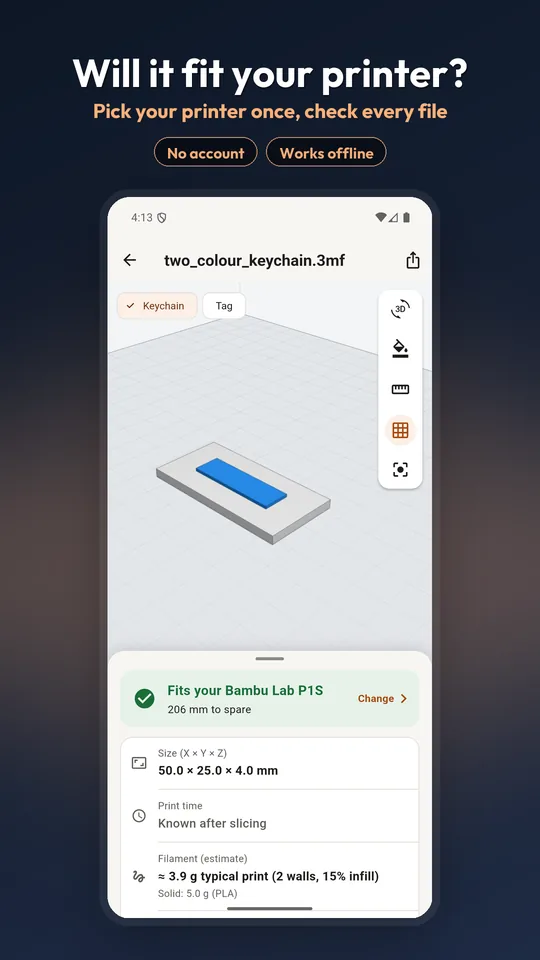
- Will it fit? Pick your printer once, and LayerPeek shows whether the model fits the bed, with the room to spare. If it does not fit as it sits, it checks whether rotating it on the bed would.
- Measure a detail. Tap two points to measure the distance between them, for example a hole that has to take a screw.
- Mesh health. Holes and open edges in a mesh can cause slicing trouble. LayerPeek points them out so you know before you send the file to a slicer.
- Overhangs. Shading marks the areas that are likely to need supports.
- Weight and cost. Choose a material and your price per kilogram for an estimate of a typical print (2 walls, 15% infill). Supports and your own slicer settings change the real number, so use it for planning.
3MF projects and sliced files
A 3MF file exported from Bambu Studio or OrcaSlicer can hold several plates and filament colours. LayerPeek opens those projects and lets you switch between plates. If the file is a sliced .gcode.3mf, the print time and the grams of each filament colour are already inside it, and LayerPeek reads them straight from the file. Nothing is sliced on your phone.
G-code files
A G-code file is the list of moves your printer will make. LayerPeek shows it layer by layer: drag the scrubber to watch the print build up, with travel moves in a different colour. The print time and filament use written in the file's header are shown as well.
If the file will not open
- The download did not finish. A file of a few bytes, or one much smaller than expected, is incomplete. Download it again.
- It is a different format. CAD files such as STEP (
.step,.stp) are not mesh files. Ask the sender to export an STL or 3MF. - The name lost its extension. Some apps rename files when they save them. Open it from inside LayerPeek with Open a file.
- It still fails. Use the contact link on the support page and say where the file came from.
Questions
Can Android open STL files without an app?
No. Android has no built-in 3D model viewer, so an STL file shows “Can't open file” or opens as text. Installing a viewer such as LayerPeek adds STL, 3MF, OBJ and G-code support.
Can I open an STL file from WhatsApp on Android?
Yes. Tap the document in the chat and choose LayerPeek when Android asks which app to use. If WhatsApp opens its own preview, use the Share button and pick LayerPeek.
Do I need an internet connection to view an STL file?
Not with LayerPeek. Files are read on the phone, there is no sign-in, and viewing works offline.
Can I print an STL file directly from my phone?
An STL file has to be sliced into G-code before a printer can use it. LayerPeek shows the model, checks that it fits your printer and reads print time from files that are already sliced; slicing itself happens in your slicer.
How do I know the size of an STL model?
Open it in LayerPeek. The overall size is shown in millimetres, and you can tap two points to measure between them.

Opens STL, 3MF, OBJ and G-code on Android and iPhone. Free to download.